



Search our help centre
Taking charge of chargebacks
Accepting card payments should grow your business, never add risk.
Learn how to protect your revenue by making transactions secure and confidently managing disputes.
Whether you're new to chargebacks or want to improve your prevention strategy, our guide covers all the basics and makes things easy to understand. And our expert team is always on hand, whenever you need.
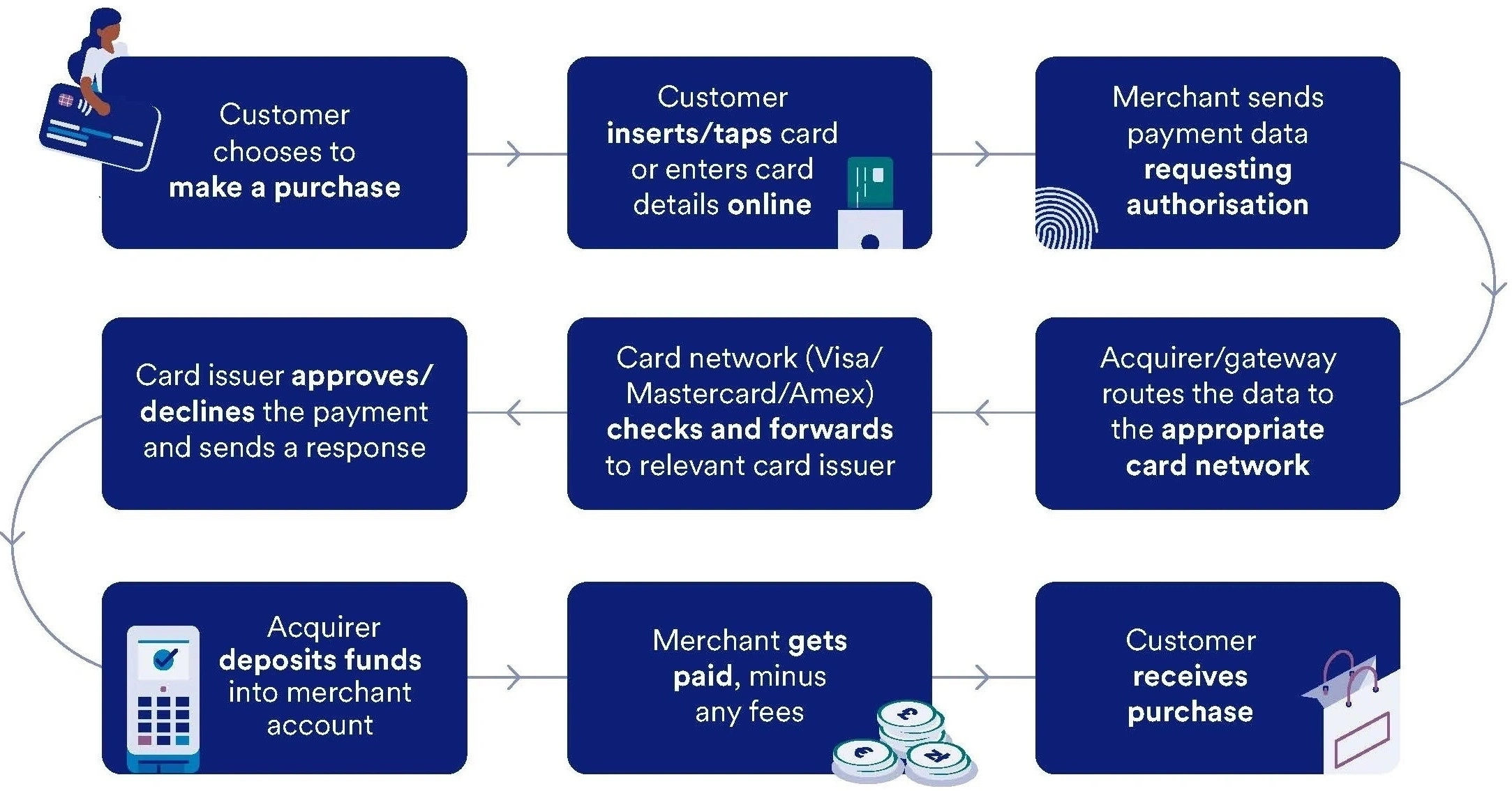
Know the flow
Understand the nitty-gritty about how payment cycles and card schemes work.
Take control
Find out how Elavon Connect can simplify responding to chargebacks.
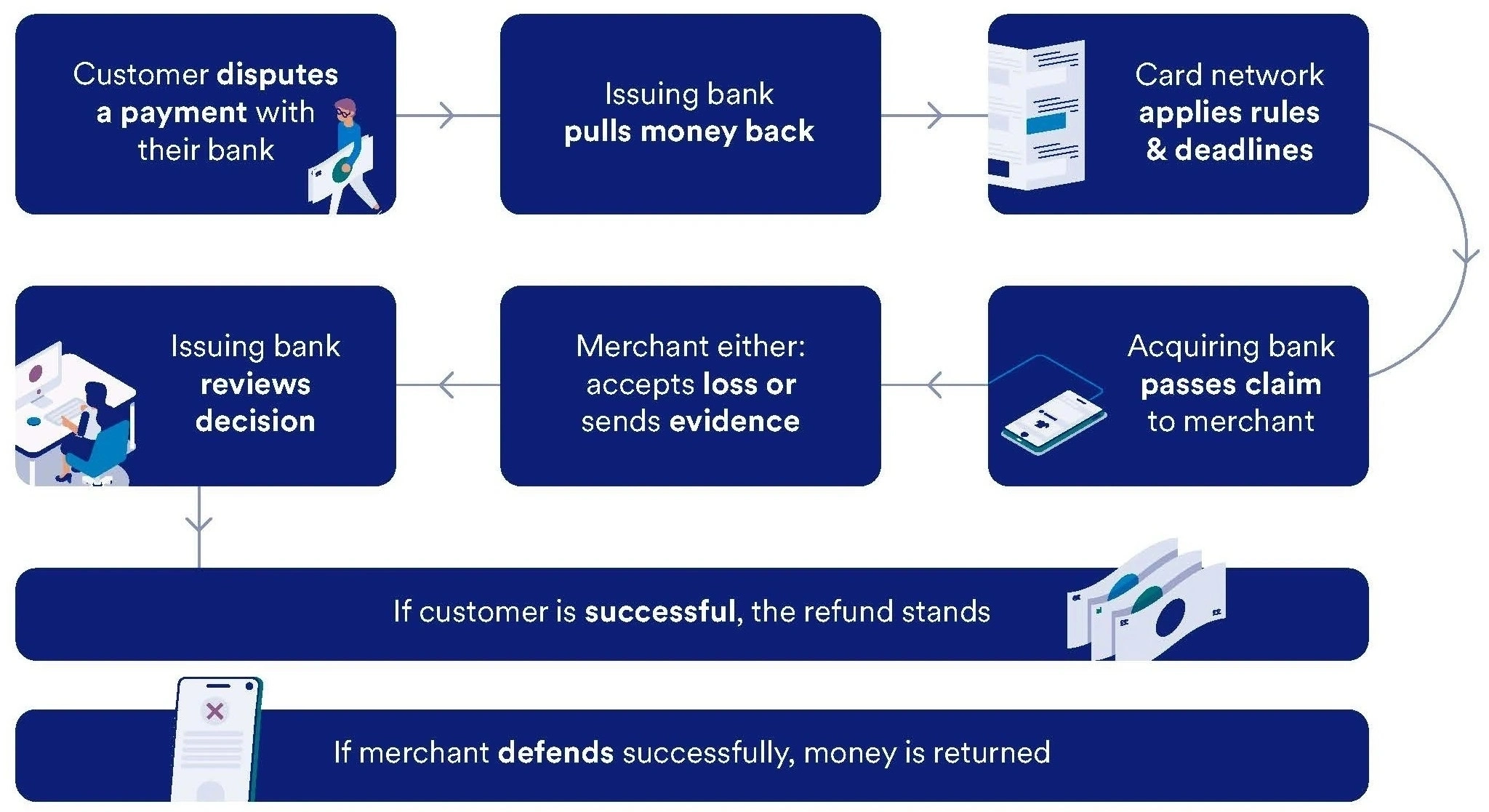
What is a chargeback?
A chargeback is when a customer asks their bank to reverse a card payment, because they believe it’s wrong or wasn’t authorised.
While chargebacks are there to protect buyers, they can cost your business money and time. Knowing how the process work helps with prevention, management and can protect your revenue.

Don’t take our word for it. Listen to our customers. Just like we do.
“The car-buying process has changed so much over the past few years: it’s been vital to introduce new payment methods, so car buyers can pay how they feel most comfortable. Car retailers have very specialist requirements and Elavon has been able to flex its solutions to meet our needs. They raised the ceiling on our transaction approval limits for secure online payments, which has been essential in an everchanging car market.”
Heather Whitmore, Head of Finance, Motorpoint
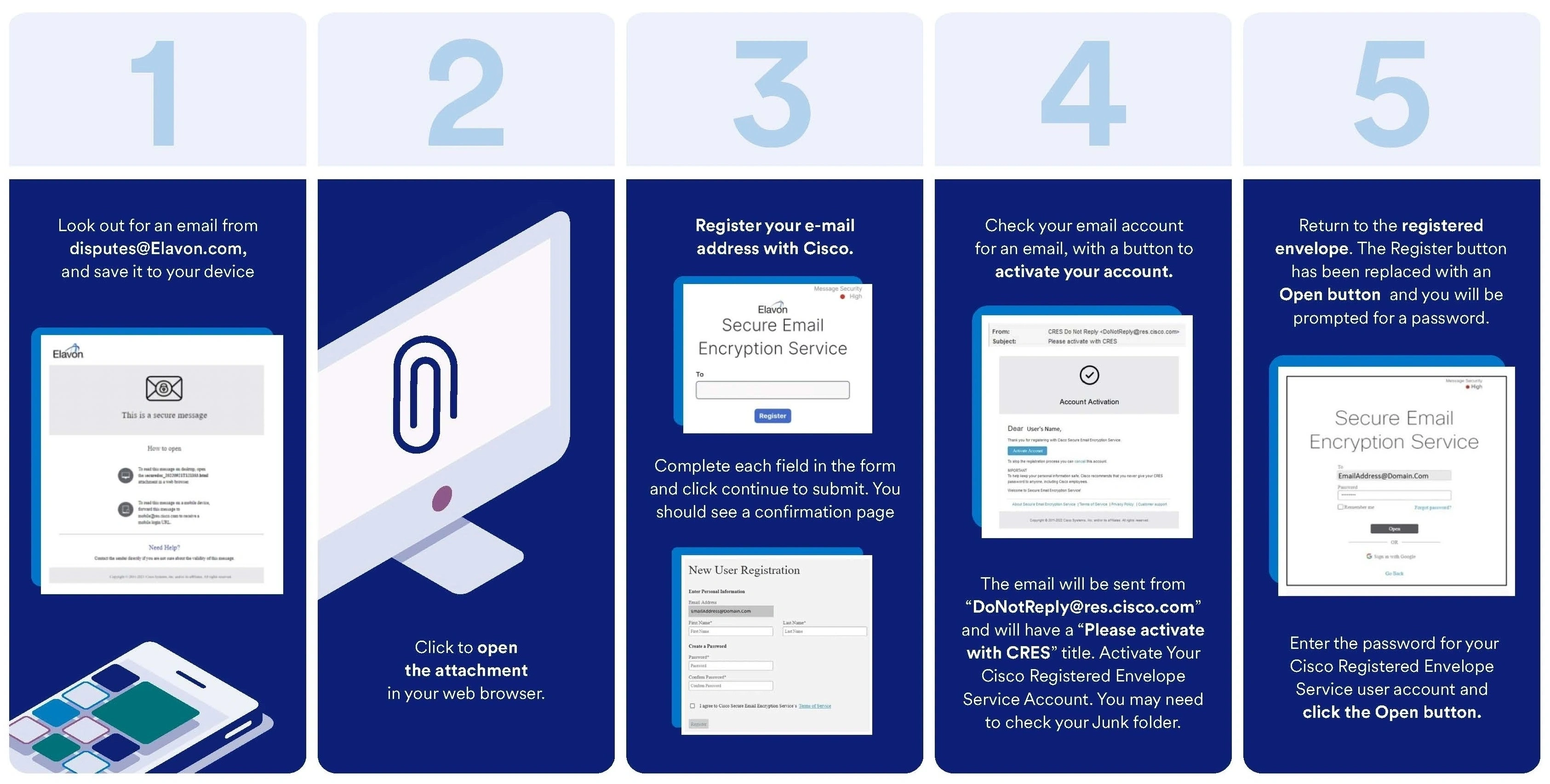
If a chargeback is raised against your business, we’ll notify you by secure email. To view these messages, you will need to register your email address - here’s how. You only need to do this once.

Helping thousands of customers around the world grow their business through payments
Customer service and support
We’re here to help!
Customer service: 0345 850 0195 (menu option 2)
Telephone: Monday to Friday 8am-5pm
Chat: Monday to Friday 8am-6pm
Elavon technical support: 0818 20 21 30 (menu option 1)
24 hours a day, 365 days a year
Opayo product support: 0191 313 0299
24 hours a day, 365 days a year
Copyright© | U.S. Bank Europe DAC. Registered in Ireland with Companies Registration Office. The liability of the member is limited. United Kingdom branch registered in England and Wales under the number BR022122.
U.S. Bank Europe DAC, trading as Elavon Merchant Services, is a credit institution authorised and regulated by the Central Bank of Ireland. Authorised by the Prudential Regulation Authority. Subject to regulation by the Financial Conduct Authority and limited regulation by the Prudential Regulation Authority. Details about the extent of our regulation by the Prudential Regulation Authority are available from us on request.
Helping thousands of customers around the world grow their business through payments
Customer service and support
We’re here to help!
Customer service: 0345 850 0195 (menu option 2)
Telephone: Monday to Friday 8am-5pm
Chat: Monday to Friday 8am-6pm
Elavon technical support: 0818 20 21 30 (menu option 1)
24 hours a day, 365 days a year
Opayo product support: 0191 313 0299
24 hours a day, 365 days a year


Copyright© | U.S. Bank Europe DAC. Registered in Ireland with Companies Registration Office. The liability of the member is limited. United Kingdom branch registered in England and Wales under the number BR022122.
U.S. Bank Europe DAC, trading as Elavon Merchant Services, is a credit institution authorised and regulated by the Central Bank of Ireland. Authorised by the Prudential Regulation Authority. Subject to regulation by the Financial Conduct Authority and limited regulation by the Prudential Regulation Authority. Details about the extent of our regulation by the Prudential Regulation Authority are available from us on request.

Essential cookies enable core functionality such as page navigation and access to secure areas. The website cannot function properly without these cookies; they can only be disabled by changing your browser preferences. Please see our Cookie Policy for further information.
Performance cookies help us to improve our website by collecting and reporting information on its usage (for example, which of our pages are most frequently visited).
These cookies and similar technologies gather information about your browsing habits. They remember that you've visited a website and share this information with other organisations, such as advertisers and platforms on which we advertise. They do this in order to provide you with advertisements that are more relevant to you and your interests. These cookies and similar technologies gather information about your browsing habits. They remember that you've visited a website and share this information with other organisations, such as advertisers and platforms on which we advertise. They do this in order to provide you with ads that are more relevant to you and your interests.
These cookies are stored under a different domain than www.elavon.co.uk. They are mostly used to track you between websites and display more relevant advertisements between websites.
Find out more about cookies on https://www.allaboutcookies.org